October 28, 2024
Guidde: Video Documentation with AI
Image generated with MidJourney October 24 2024

Introduction
Today, I’m going to be talking about a new tool called Guidde. Founded in 2021, Guidde is an AI app that allows you to quickly create a video and text-based documentation for your knowledge base. In fact, it refers to itself as a as a “video documentation company”. A lot of departments in software companies create videos to support their customers. If you’ve ever created these types of recordings you’ve experienced the need to re-record or edit the initial recordings. You may have missed narrating a critical step, or referenced a feature incorrectly. You may have even left a file or tab opened that you didn’t want anyone to see – especially a customer. Tools like Camtasia and Descript have made some of these editing needs a lot easier but it can still be a bit time consuming.
Perhaps you aren’t so concerned about getting a pristine video. Tools like Screencastify and Loom function in a very similar but there are a couple of key differences that are worth noting and we’ll explore today.
I began the exercise by subscribing to the “Business Plan” and selected a simple task – “signing up for Synthesia from a Google account”. You can see the results of the capture here. Guidde is very quick and easy to use. It functions through an extension that works in both Chrome and Microsoft Edge, keeping it readily available which is really nice. I used the Chrome extension and had no issues with crashingYou simply begin to capture the screen just like other tools such as Screencastify, Loom and Vidyard just to name a few. but this is where the first difference emerges.
Guidde captures your mouse movements and outputs text, video and AI narration. You don’t need to capture your voice. Guidde will do it for you. It creates step-by-step text instructions with screen shots based on your clicks and hovers accompanied by a narrated video.
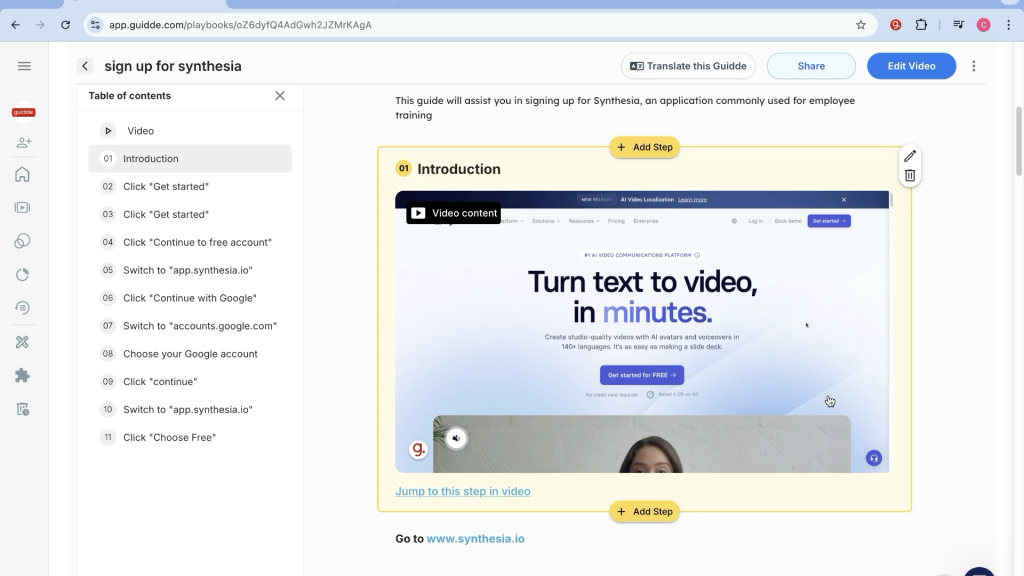
Example of Guidde capturing steps to sign up for Synthesia. Left side of screen are tyeh text steps so you can quickly jump to edit. Video and screen shots with text descriptions is on the right.
Production
Now you can see from that image above that the tool is not perfect. You can see doubles of “Click “Get Started”. But editing is quite simple and it most definitely saves you a ton of time. You can go in and add, remove or change a step based on the instructional message you’re trying to convey.
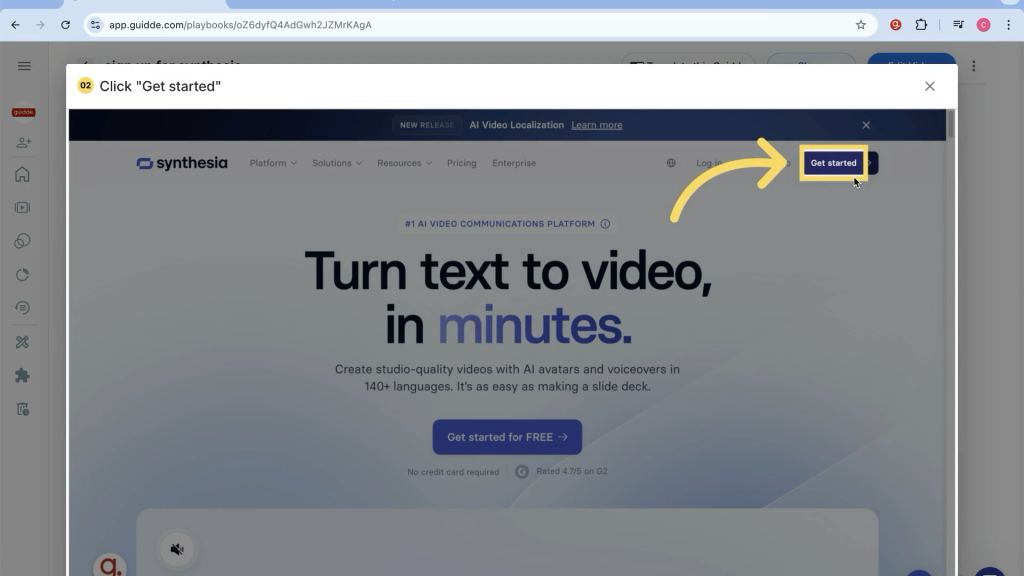
Another great feature is the ability to expand each screen shot so you could get a better or closer look, which is always required some editing. When you’re working with screen grab, some of the functionality of very small, like the example below. Now you can click the image and immediately see the feature. Note that Guidde also highlighted the feature so draw attention. This allows the learner to focus reducing cognitive overload. Very helpful.
Example of exandable screen grab along with call outs to aid in direction.
So this is where I see the first real benefit of a tool like Guidde. It saves you a lot of time. Yes, there are tools that exist where you can edit a video and export screens such as Camtasia or After Effects, but doing a little back of the napkin math, that would takes a few hours of work. You can also program the popup window with a little javascript and add some additional time to the workflow. Let’s add a day for that popup because most Education and Enablement teams don’t have the coding skills. My rough calculation has this quick tutorial with screen grabs combined with text instructions with expandable popups becoming a rather large project. Each video could take at least a day. And we don’t usually create just one tutorial. Most tasks take more than one. Let’s say we need to create five tutorials which isn’t unlikely. That’s a full week of work and we haven’t even gotten to reviews. Using Guidde, a single tutorial with editing could take an hour and that’s assuming you have to do a bunch of changes to the capture. Even with five tutorials you would be cutting your production time down from five days to five hours. So now that we created these tutorials how can we distribute them and even more importantly how can we measure their effectiveness? Let’s take a look.
Sharing
Sharing your tutorial is very simple and follows many of the same established user functionality as Google. You can set whether you want your file to be shared publicly or privately as well as share to different social networks.
“Smart Copy” allows you to copy formatted code for different customer management products ranging from Webflow through Confluence, Zendesk and Salesforce as well as a variety of markdown languages.
Share feature allows you to copy code for a variety of applications.

You can export tracking links to help you track the activity when users watch public content in Intercom, ServiceNow, Zendesk and more. Finally you can export the file as a PDF or video that is optimized for search with an upgraded plan. It’s not available in the Business Plan.
With that upgrade you can add translations, add natural sounding voiceover using typed text and more. For most companies, I would recommend the upgrade to improve the voice quality. You also gain to a desktop app. They do not have that on the business level and I felt it was an important feature. Not every application runs in a browser. In fact many have some type of desktop client. This is also a new feature released last week. I wasn’t able to test it.
Reporting & Integrations
Within the Guidde dashboard you have access to standard reporting metrics such as number of loads, number of views, and % viewed . This is averaged based on your desired timeframe, but the real power is in the integrations. Being able to quickly integrate with Salesforce, INtrecome, Zendesk and Confluence is a win in my book
Conclusion
This is where the power of the tool shines. I’m a big proponent of integrating learning through out the prospect lifecycle into the customer journey, but its effectiveness hasn’t always been easy to capture due to time consuming integrations and data aggregation into a data lake. Guidde created a Customer Enablement Map that describes the key technologies often used at different stages of the journey. You could present Guidde in its native format at different key points however if you leverage the integration suddenly you have a single solution that is multi-modal (text and video) and can be analyzed for its effectiveness. Views are great – sales are better. Seeing the overall influence – what works and when, can really help push improve your sales conversions, reduce onboarding time and improve adoption and expansion opportunities. I could see using their “spaces” feature to hone in on what tutorials are most effective at each stage thus optimizing your customer enablement process.