October 15, 2024
NotebookLM: Audio Overviews Experiments

Introduction
I’ve been experimenting with NotebookLM a bit. For those that may not be aware, NotebookLM is an AI-powered research tool that helps users understand complex information by summarizing sources and providing relevant quotes as well as additional questions the researcher might explore. It was developed by Google and is based on their Gemini language model. NotebookLM primarily works with text based information. So you can insert PDFs, documents, Text files, as well as webpages URLs and files in your Google Drive. You can use links to videos they must have transcriptions. NotebookLM only supports English right now.
Experiment 1:
Single source
Original source:
The 2024 State of Investment Data Management Study: (2024, May 29).
It’s pretty fast and the 2 voices are decent. The accuracy was also good. I know people latch onto hallucinations but these audio files are initially restricting sources to what you provide it. It doesn’t add additional materials until you allow it to explore and ask it questions. So that was a podcast created with one source. I thought it was pretty cool so I wanted to see about combining sources as well as more complex technical information.
First – more complex technical information. I decided to limited to a single source because I didn’t want to introduce another variable while comparing quality to the first experiment. I’m into solar technology and follow a few people in that space. This gentleman has a post on Facebook that discussed his configuration. I copied and pasted his post into NotebookLM. This is where things start to fall apart for me.
I can’t give you the pasted copy but if you listen the narration initially has the female voice as the person who did the configuration then suddenly its the male voice as the individual that configured the solution. So complex technical information didn’t quite work even with one source.
Lauzon, K. Ecoflow Delta Pro Facebook Group. (n.d.).
Experiment 2:
Multiple sources
Next experiment – I tried multiple sources to see if it could synthesize the information. This used 2 sources. I used the previous Clearwater Poll in experiment 1 as a PDF and added a webpage from the same company. The target audience for this type of information would be financial analysts, accounting staff and corporate finance people who need to report to the government. So its a fairly tight topic. My issue here is the tone is too casual for the topic and the results also seem to leave out some of the information it captured in the single source experiment. The second source that was added was sijply a web page. So the weighting of the information is odd.
Original sources:
The 2024 State of Investment Data Management Study: (2024, May 29).
Reporting for Institutional Investing: (2023, March 01).
Experiment 3:
Many sources
Lastly, I took a complex topic. Augmented Reality and its use in Education. I used 8 sources. Some were peer reviewed and others were commercially accessible websites. I wanted to use video but remember that video must have a transcript to work and I couldn’t find anything decent. In hindsight it was a good thing because I didn’t bring in another variable.
Original sources:
Wahyuanto, E., & Heriyanto, & Hastuti, S. (May 2024). Study of the Use of Augmented Reality Technology in Improving the Learning Experience in the Classroom. West Science Social and Humanities Studies, Vol. 02, No. 05, May 2024, pp. 700-705
Shalimov, A. (2023, April 12). Augmented Reality in Education: How to Apply It to Your EdTech Business. Eastern Peak. https://easternpeak.com/blog/augmented-reality-in-education/
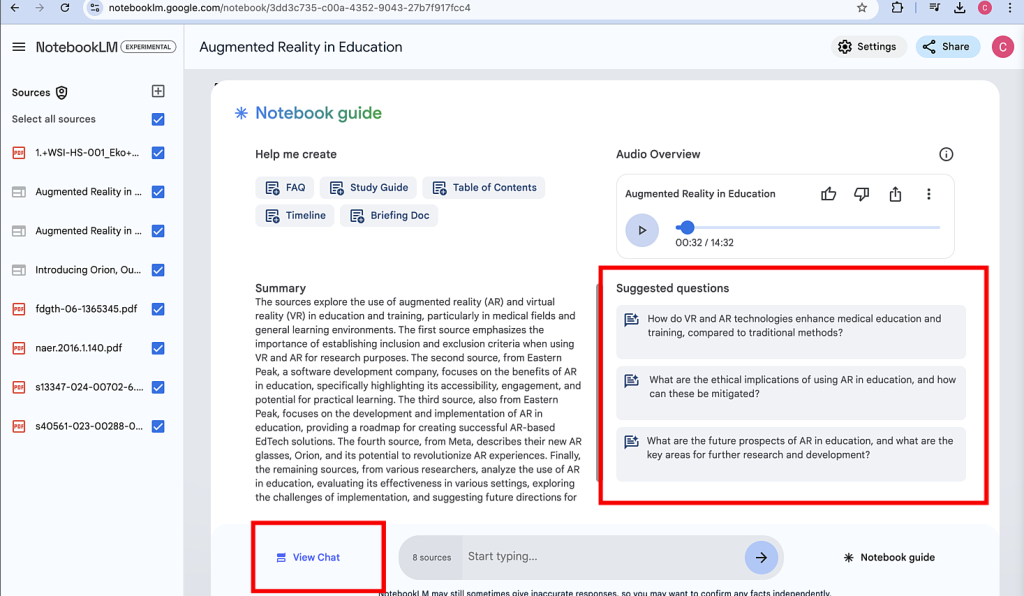
Again – too casual for me but it did a decent job synthesizing the information. Yes it can take a source file and make an audio file, but the real power is the recommendation of additional questions. This allows you to “partner” with NotebookLM and hone in on your discussion. In the image below you can see how the tool suggests additional questions and allows you to chat with Gemini and make the output more focused and perhaps accurate.
Synopsis
So my synopsis – it’s a good tool but it’s definitely still in its experimental phase.
- Technically you can only generate wav files. That’s just crazy to me. I had to convert them to mp3.
- They need more voices. No brainer.
- They need to add functionality that allows for changes in tonality.
- I would like to select the number of people in the discussion as well as their accent and tone.
- There is no way that I could find to edit the audio text.
The upside is you can dive into the topic further.
The tool recommends additional questions. This is where you can get into hallucinations but in my opinion. Hallucinations can range from a few percent to more significant percentages, depending on the complexity of the task and the quality of the training data so prompt knowledge is critical.
Workarounds
There are some workarounds. you could take the exported audio file into Descript and generate a script that you can easily edit. You can also applied a dedicated voice from your library of actors – OR you can use Eleven Labs which has great voices in my opinion.